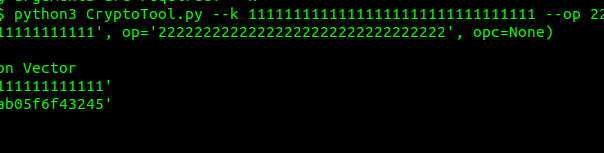
Namespace(k='11111111111111111111111111111111', op='22222222222222222222222222222222', opc=None) Generating OPc key from OP & K Generating Multimedia Authentication Vector Input K: b'11111111111111111111111111111111' Input OPc: b'2f3466bd1bea1ac9a8e1ab05f6f43245' Input AMF: b'\x80\x00'
Of course, being open source, you can grab the functions out of this and make a little script to convert everything in a CSV or whatever format your key data is in.
So what about OPc to OP? Well, this is a one-way transaction, we can’t get the OP Key from an OPc & Ki.
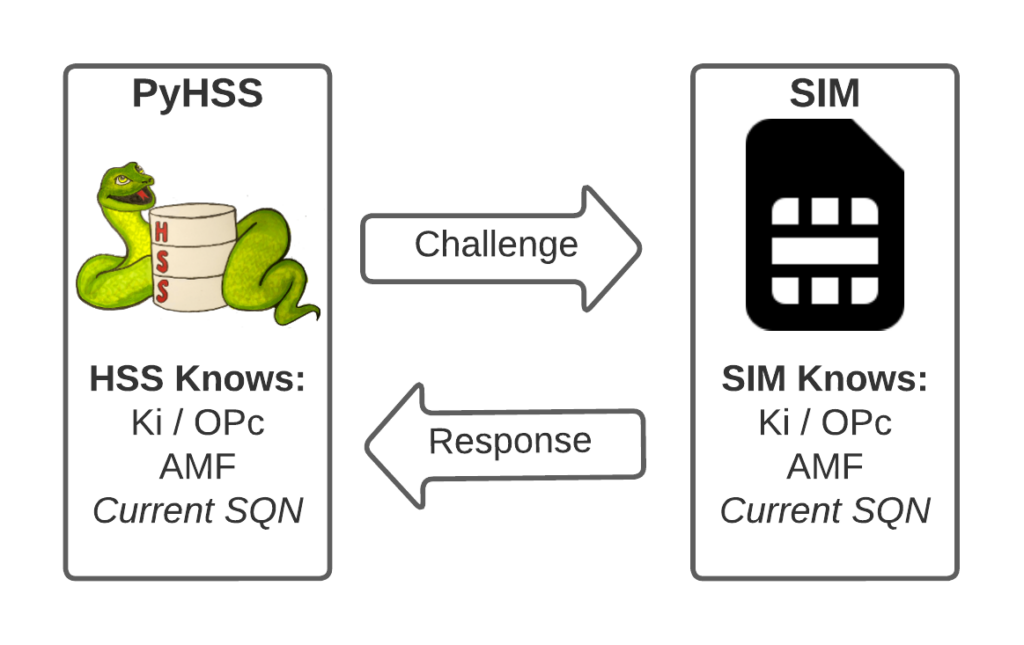
I’ve written about Milenage and SIM based security in the past on this blog, and the component that prevents replay attacks in cellular network authentication is the Sequence Number (Aka SQN) stored on the SIM.
Think of the SQN as an incrementing odometer of authentication vectors. Odometers can go forward, but never backwards. So if a challenge comes in with an SQN behind the odometer (a lower number), it’s no good.
Why the SQN is important for Milenage Security
Every time the SIM authenticates it ticks up the SQN value, and when authenticating it checks the challenge from the network doesn’t have an SQN that’s behind (lower than) the SQN on the SIM.
Let’s take a practical example of this:
The HSS in the network has SQN for the SIM as 8232, and generates an authentication challenge vector for the SIM which includes the SQN of 8232. The SIM receives this challenge, and makes sure that the SQN in the SIM, is equal to or less than 8232. If the authentication passes, the new SQN stored in the SIM is equal to 8232 + 1, as that’s the next valid SQN we’d be expecting, and the HSS incriments the counters it has in the same way.
By constantly increasing the SQN and not allowing it to go backwards, means that even if we pre-generated a valid authentication vector for the SIM, it’d only be valid for as long as the SQN hasn’t been authenticated on the SIM by another authentication request.
Imagine for example that I get sneaky access to an operator’s HSS/AuC, I could get it to generate a stack of authentication challenges that I could use for my nefarious moustache-twirling purposes whenever I wanted.
This attack would work, but this all comes crumbling down if the SIM was to attach to the real network after I’ve generated my stack of authentication challenges.
If the SQN on the SIM passes where it was when the vectors were generated, those vectors would become unusable.
It’s worth pointing out, that it’s not just evil purposes that lead your SQN to get out of Sync; this happens when you’ve got subscriber data split across multiple HSSes for example, and there’s a mechanism to securely catch the HSS’s SQN counter up with the SQN counter in the SIM, without exposing any secrets, but it just ticks the HSS’s SQN up – It never rolls back the SQN in the SIM.
The Flaw – Draining the Pool
The Authentication Information Request is used by a cellular network to authenticate a subscriber, and the Authentication Information Answer is sent back by the HSS containing the challenges (vectors).
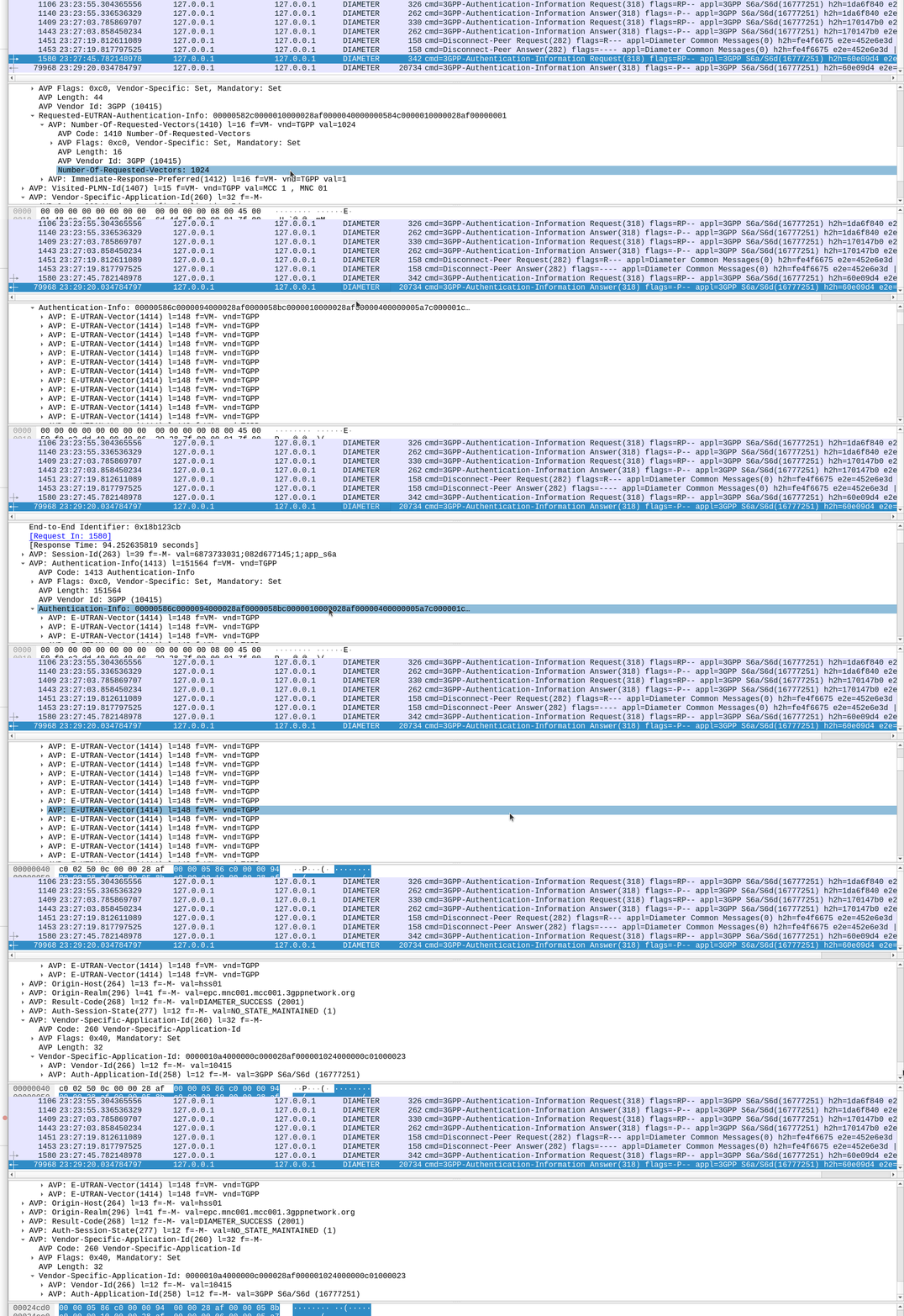
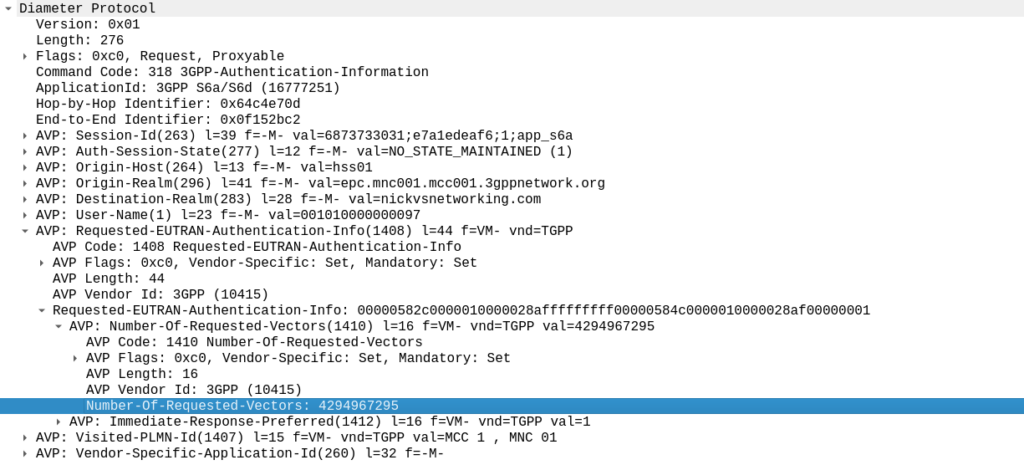
When we send this request, we can specify how many authentication challenges (vectors) we want the HSS to generate for us, so how many vectors can you generate?
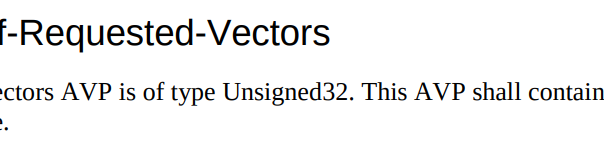
TS 129 272 says the Number-of-Requested-Vectors AVP is an Unsigned32, which gives us a possible pool of 4,294,967,295 combinations. This means it would be legal / valid to send an Authentication Information Request asking for 4.2 billion vectors.
It’s worth noting that that won’t give us the whole pool.
Sequence numbers (SQN) shall have a length of 48 bits.
TS 133 102
While the SQN in the SIM is 48 bits, that gives us a maximum number of values before we “tick over” the odometer of 281,474,976,710,656.
If we were to send 65,536 Authentication-Information-Requests asking for 4,294,967,295 a piece, we’d have got enough vectors to serve the sub for life.
Except the standard allows for an unlimited number of vectors to be requested, this would allow us to “drain the pool” from an HSS to allow every combination of SQN to be captured, to provide a high degree of certainty that the SQN provided to a SIM is far enough ahead of the current SQN that the SIM does not reject the challenges.
Can we do this?
Our lab has access to HSSes from several major vendors of HSS.
Out of the gate, the Oracle HSS does not allow more than 32 vectors to be requested at the same time, so props to them, but the same is not true of the others, all from major HSS vendors (I won’t name them publicly here).
For the other 3 HSSes we tried from big vendors, all eventually timed out when asking for 4.2 billion vectors (don’t know why that would be *shrug*) from these HSSes, it didn’t get rejected.
This is a lab so monitoring isn’t great but I did see a CPU spike on at least one of the HSSes which suggests maybe it was actually trying to generate this.
Of course, we’ve got PyHSS, the greatest open source HSS out there, and how did this handle the request?
Well, being standards compliant, it did what it was asked – I tested with 1024 vectors I’ll admit, on my little laptop it did take a while. But lo, it worked, spewing forth 1024 vectors to use.
So with that working, I tried with 4,294,967,295…
And I waited. And waited.
And after pegging my CPU for a good while, I had to get back to real life work, and killed the request on the HSS.
In part there’s the fact that PyHSS writes back to a database for each time the SQN is incremented, which is costly in terms of resources, but also that generating Milenage vectors in LTE is doing some pretty heavy cryptographic lifting.
The Risk
Dumping a complete set of vectors with every possible SQN would allow an attacker to spoof base stations, and the subscriber would attach without issue.
Historically this has been very difficult to do for LTE, due to the mutual network authentication, however this would be bypassed in this scenario.
The UE would try for a resync if the SQN is too far forward, which mitigates this somewhat.
Cryptographically, I don’t know enough about the Milenage auth to know if a complete set of possible vectors would widen the attack surface to try and learn something about the keys.
Mitigations / Protections
So how can operators protect ourselves against this kind of attack?
Different commercial HSS vendors handle this differently, Oracle limits this to 32 vectors, and that’s what I’ve updated PyHSS to do, but another big HSS vendor (who I won’t publicly shame) accepts the full 4294967295 vectors, and it crashes that thread, or at least times it out after a period.
If you’ve got a decent Diameter Routing Agent in place you can set your DRA to check to see if someone is using this exploit against your network, and to rewrite the number of requested vectors to a lower number, alert you, or drop the request entirely.
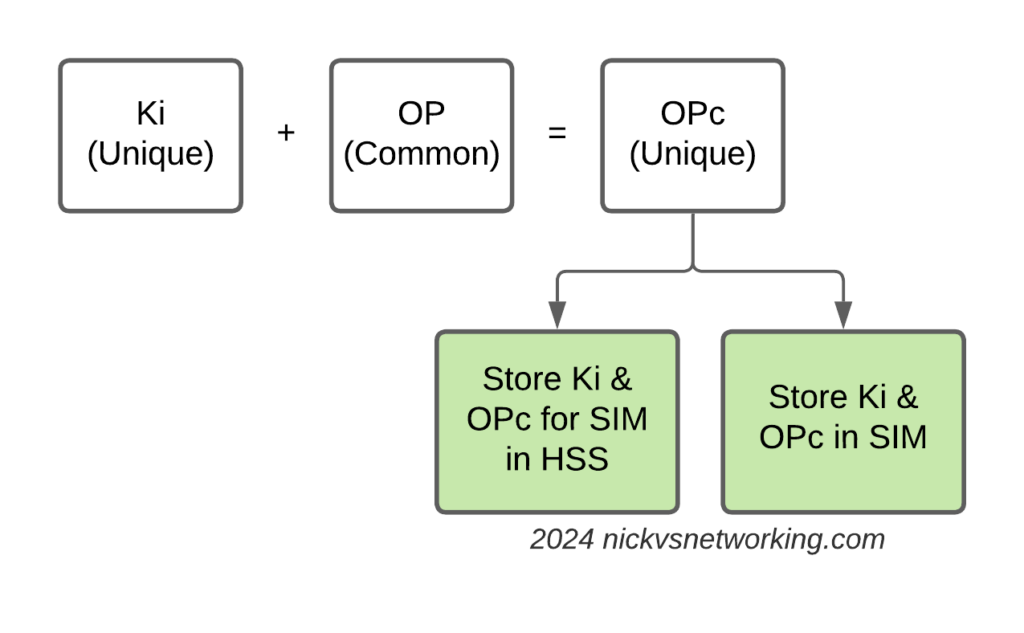
Having common OP keys is dumb, and I advocate to all our operator customers to use OP keys that are unique to each SIM, and use the OPc key derived anyway. This means if one SIM spilled it’s keys, the blast doesn’t extend beyond that card.
In the long term, it’d be good to see 3GPP limit the practical size of the Number-of-Requested-Vectors AVP.
2G/3G Impact
Full disclosure – I don’t really work with 2G/3G stacks much these days, and have not tested this.
MAP is generally pretty bandwidth constrained, and to transfer 280 billion vectors might raise some eyebrows, burn out some STPs and take a long time…
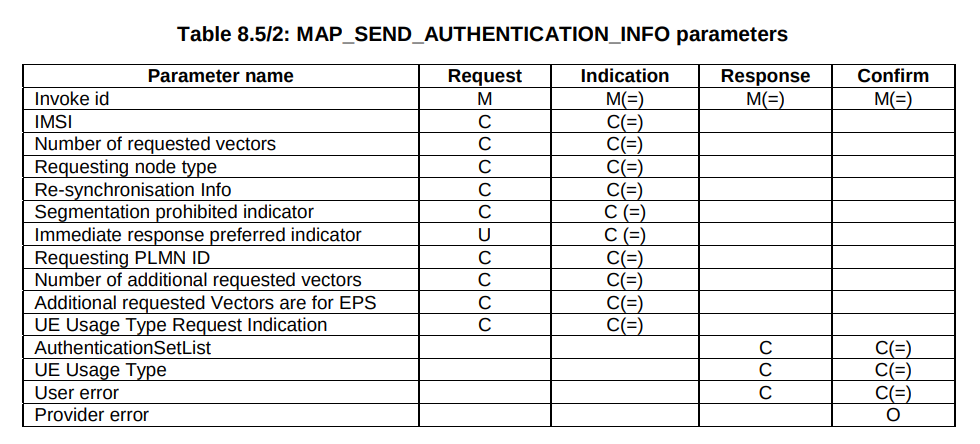
But our “Send Authentication Info” message functions much the same as the Authentication Information Request in Diameter, 3GPP TS 29.002 shows we can set the number of vectors we want:
5GC Vulnerability
This only impacts LTE and 5G NSA subscribers.
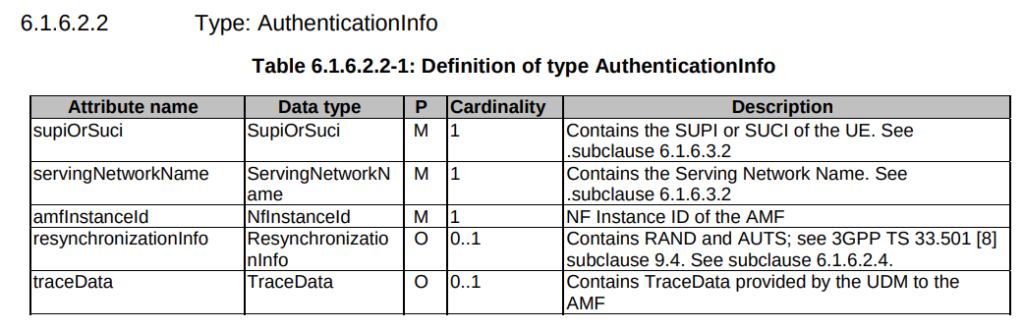
TS 29.509 outlines the schema for the Nausf reference point, used for requesting vectors, and there is no option to request multiple vectors.
Summary
If you’ve got baddies with access to your HSS / HLR, you’ve got some problems.
But, with enough time, your pool could get drained for one subscriber at a time.
This isn’t going to get the master OP Key or plaintext Ki values, but this could potentially weaken the Milenage security of your system.
One of the new features of 5GC is the introduction of Service Based Interfaces (SBI) which is part of 5GC’s Service Based Architecture (SBA).
Let’s start with the description from the specs:
3GPP TS 23.501 [3] defines the 5G System Architecture as a Service Based Architecture, i.e. a system architecture in which the system functionality is achieved by a set of NFs providing services to other authorized NFs to access their services.
3GPP TS 29.500 – 4.1 NF Services
For that we have two key concepts, service discovery, and service consumption
Services Consumer / Producers
That’s some nice words, but let’s break down what this actually means, for starters, let’s talk about services.
In previous generations of core network we had interfaces instead of services. Interfaces were the reference point between two network elements, describing how the two would talk. The interfaces were the protocols the two interfaces used to communicate.
For example, in EPC / LTE S6a is the interface between the MME and the HSS, S5 is the interface between the S-GW and P-GW. You could lookup the 3GPP spec for each interface to understand exactly how it works, or decode it in Wireshark to see it in action.
5GC moves from interfaces to services. Interfaces are strictly between two network elements, the S6a interface is only used between the MME and the HSS, while a service is designed to be reusable.
This means the Service Based Interface N5g-eir can be used by the AMF, but it could equally be used by anyone else who wants access to that information.
3GPP defines the service in the form of service producer (The EIR produces the N5g-eir service) and the service consumer (The client connecting to the N5g-eir service), but doens’t restrict which network elements can
This gets away from the soup of interfaces available, and instead just defines the services being offered, rather than locking the
“service consumers” (which can be thought of clients in a client/server model) can discover “service producers” (like servers in a client/server model).
Our AMF, which acts as a “service consumer” consuming services from the UDM/UDR and SMF.
Service Discovery – Automated Discovery of NF Services
Service-Based Architecture enables 5G Core Network Function service discovery.
In simple terms, this means rather that your MME being told about your SGW, the nodes all talk to a “Network Repository Function” that returns a list of available nodes.
The mobility management and connection management process in 5GC focuses on Connection Management (CM) and Registration Management (RM).
Registration Management (RM)
The Registration Management state (RM) of a UE can either be RM-Registered or RM-Deregistered. This is akin to the EMM state used in LTE.
RM-Deregistered Mode
From the Core Network’s perspective (Our AMF) a UE that is in RM-Deregistered state has no valid location information in the AMF for that UE. The AMF can’t page it, it doesn’t know where the UE is or if it’s even turned on.
From the UE’s perspective, being in RM-Deregistered state could mean one of a few things:
UE is in an area without coverage
UE is turned off
SIM Card in the UE is not permitted to access the network
In short, RM-Deregistered means the UE cannot be reached, and cannot get any services.
RM-Registered Mode
From the Core Network’s perspective (the AMF) a UE in RM-Registered state has sucesfully registered onto the network.
The UE can perform tracking area updates, period registration updates and registration updates.
There is a location stored in the AMF for the UE (The AMF knows at least down to a Tracking Area Code/List level where the UE is).
The UE can request services.
Connection Management (CM)
Connection Management (CM) focuses on the NAS signaling connection between the UE and the AMF.
To have a Connection Management state, the Registration Management procedure must have successfully completed (the UE being in RM-Registered) state.
A UE in CM-Connected state has an active signaling connection on the N1 interface between the UE and the AMF.
CM-Idle Mode
In CM-Idle mode the UE has no active NAS connection to the AMF.
UEs typically enter this state when they have no data to send / recieve for a period of time, this conserves battery on the UE and saves network resources.
If the UE wants to send some data, it performs a Service Request procedure to bring itself back into CM-Connected mode.
If the Network wants to send some data to the UE, the AMF sends a paging request for the UE, and upon hearing it’s identifier (5G-S-TMSI) on the paging channel, the UE performs the Service Request procedure to bring itself back into CM-Connected mode.
CM-Connected Mode
In CM-Connected mode the UE has an active NAS connection with the AMF over the N1 interface from the UE to the AMF.
When the access network (The gNodeB) determines this state should change (typically based on the UE being idle for longer than a set period of time) the gNodeB releases the connection and the UE transitions to CM-Idle Mode.
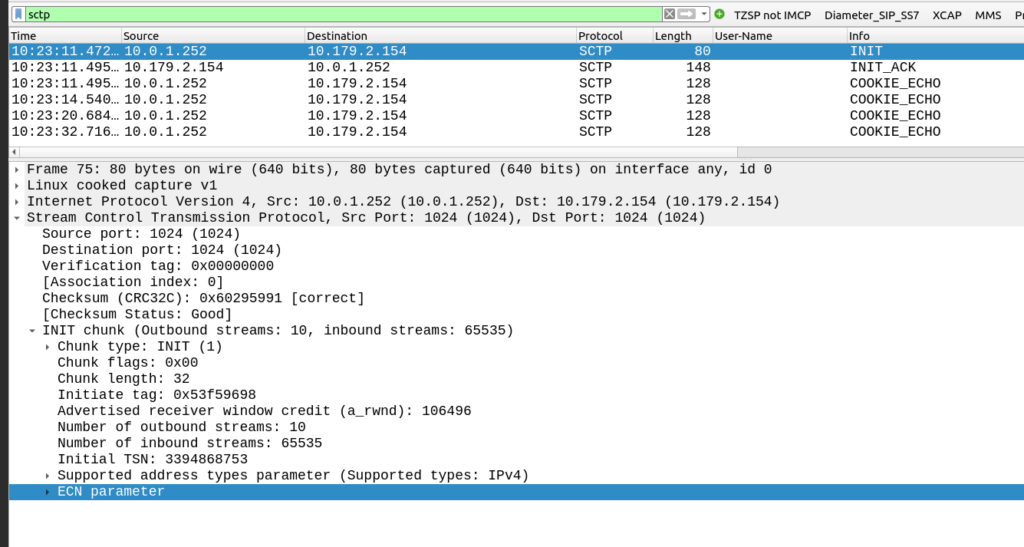
The other side of the SCTP connection didn’t like my SCTP parameters.
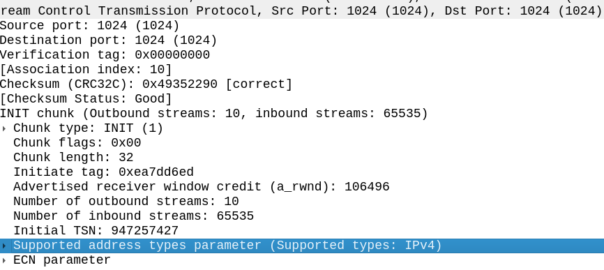
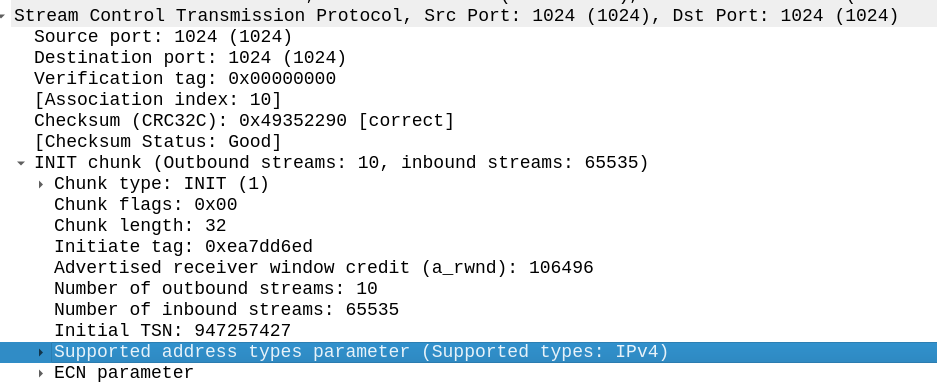
My SCTP INIT looked like this:
By default, Linux includes support for the ECN and SupportedAddressTypes parameters in the SCTP INIT.
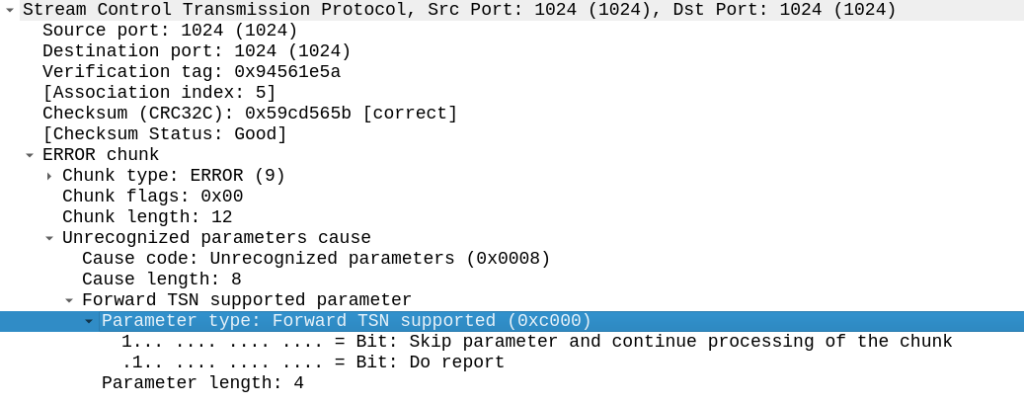
But the other side did not like this, it sent back an ERROR stating that:
Okay, apparently it doesn’t like the fact that we support Forward Transmission Sequence Numbers – So how to turn it off?
I’m using P1Sec’s PySCTP library to interact with the SCTP stack, and I couldn’t find any referneces to this in the code, but then I rememberd that PySCTP is just a wrapper for libsctp so I should be able to control it from there.
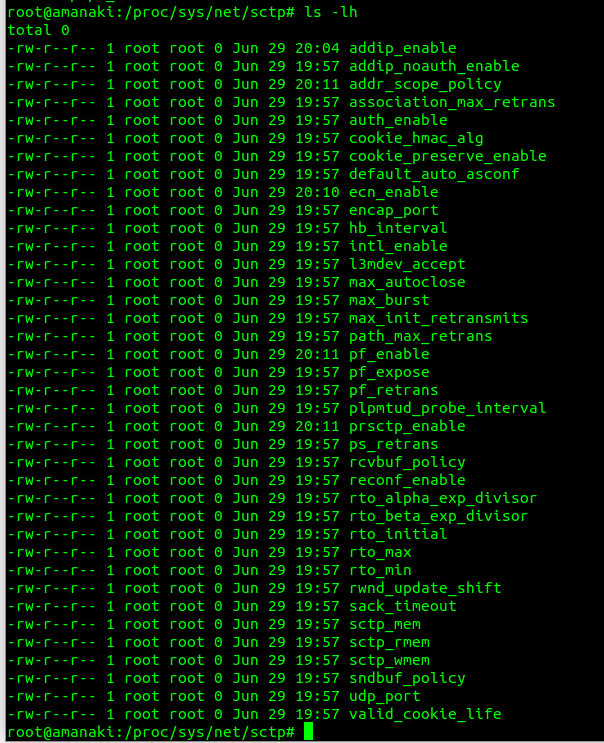
Inside /proc/sys/net/sctp we can see all the parameters we can control.
To disable the Forward TSN I need to disable the feature that controls it – Forward Transmission Sequence numbers are introduced in the Partial Reliability Extension (RFC 3758). So it was just a matter of disabling that with: