Monthly Archives: December 2022

Most Popular Articles of 2022

Yes, this is a lazy post. As the year draws to a close I was asked to put together a list of the most popular posts of the year.

Of the posts written this, year, there’s been a lot for people who build and work on networks to make their lives easier and their workflows more efficient.

For builders of networks, the series Diameter Routing Agents, why you need them and how to build them is something I’m really happy with, and we started our series on CGrateS the amazingly complete and feature filled OCS / Billing engine, it is a hard slog to learn, but the payoff is worth it, and we’ll continue to build on in 2023.

For skills every engineer should have, the Filtering for 3GPP DNS in Wireshark will make debugging issues with SRV records, NAPTR and IMS easier.

If you’re looking for free tools to help your workflow in the cellular space, Scratch’n’nSniff makes remote packet captures a breeze, and our Remote Handset Tester allows us to test mobile phones inside our network from anywhere on the planet.

The most popular posts this year weren’t actually from this year, this time last year I posted the Evolved Packet Core Analysis Challenge – The Skill-tester / Claw Machine of the Telecom world, test your EPC knowhow and skills!

As more and more readers are starting to work with 5GC this past year, My first 5G Core: Open5Gs and UERANSIM has been very popular as folks dip a toe in the water with 5GC.

As people are faced with the idea of actually implementing 5G standalone, SUCIs an SUPIs are something people are looking to understand, and see how this plays on the auth side, USIM Authentication in 5G/NR has been referenced a lot, along with the confidentiality algorithms used in 3GPP networks.

As people are introduced to the NRF, the post “If you like Pina Coladas, and service the control plane – Intro to NRF in 5GC” has also seen a lot of traffic.

On a personal notes, it looks like I finished every book in my reading list (Except Girdle Round the Earth that’s still on my bedside table), I did take a break from writing around the middle of the year, but weekly ish posts are coming back.

If you have a problem, if no one else can help, and if you can find me, drop me a line – [email protected] / LinkedIn / Twitter.
Demystifying SS7 & Sigtran – Part 6 – Calling with ISUP

So far in our lab we’ve got connectivity between to points, but we’re not carrying any useful data on top of it.

In the same way that TCP is great, but what makes it really useful is carrying application layers like HTTP on top, MTP3 exists to facilitate carrying higher-layer protocols, like ISUP, MAP, SCCP, etc, so let’s get some traffic onto our network.

ISUP is the ISDN User Part, ISUP is used to setup and teardown calls between two exchanges / SSPs – it’s the oldest and the most simple SS7 application to show off, so that’s what we’ll be working with today.

If you’ve not dealt much with ISDN in the past, then that’s OK – we’re not going to deep dive into all the nitty gritty of how ISDN Signaling works, but we’ll just skim the surface to showing how SS7/Sigtran transports the ISUP packets. So you can see how SS7 is used to transport this protocol.

Very Basic ISDN Signalling

ISUP is used to setup and teardown calls between telephone exchanges, which in SS7 networks, are the Service Switching Points (SSPs) we talked about in this post.

You can think of it a lot like SIP, which is if not the child of ISUP, then it at least bares a striking resemblance.

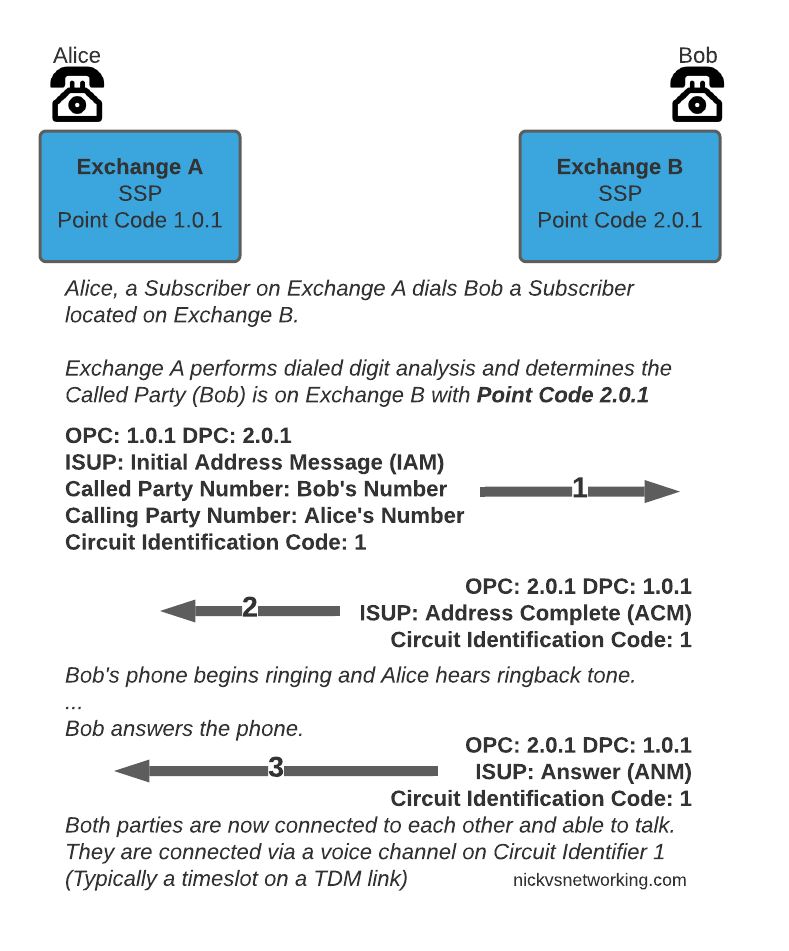
So let’s look at an ISUP call flow:

The call is initiated with an Initial Address Message (IAM), akin to a SIP INVITE, sent by the SSP/Exchange of the calling party to the SSP/Exchange of the called party.
When the remote party starts to ring, the remote exchange sends an Address Complete (ACM), which is similar to a 100 TRYING in SIP.
Once the remote party answers, the remote exchange sends back an Answer Message (ANM), and our call starts, just like a 200 OK.

Rather than SDP for transferring media, timeslots or predefined channels / circuits are defined, each identified by a number, which both sides will use for the media path.

Finally whichever side terminates the call will send a Release (REL) message, which is confirmed with the Release Complete (RLC).

I told you we’d be quick!

So that’s the basics of ISUP, in our next post we’ll do some PCAP analysis on real world ISUP flows!

SMS-over-IP Message Efficiency – K

Recently I read a post from someone talking about efficiency of USSD over IMS, and how crazy it was that such a small amount of data used so much overhead to get transferred across the network.

Having built an SMSc a while ago, my mind immediately jumped to SMS over IMS as being a great example of having so much overhead.

If we’re to consider sending the response “K” to a text message, how much overhead is there?

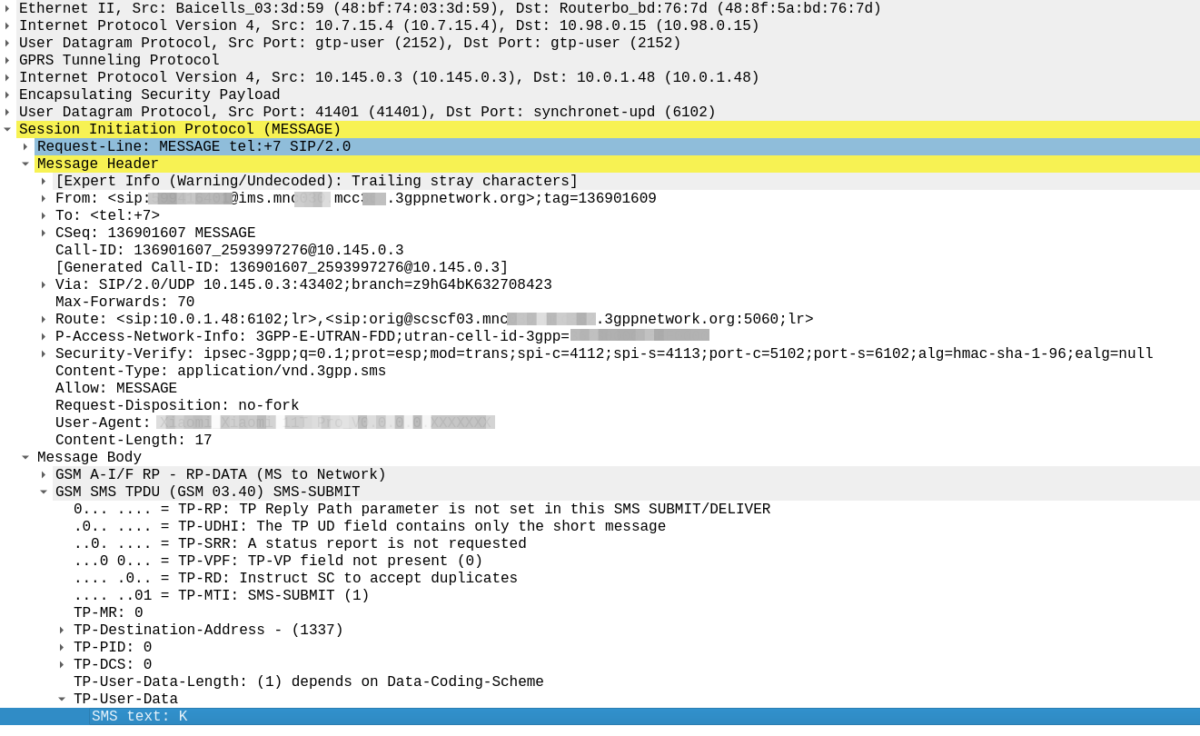
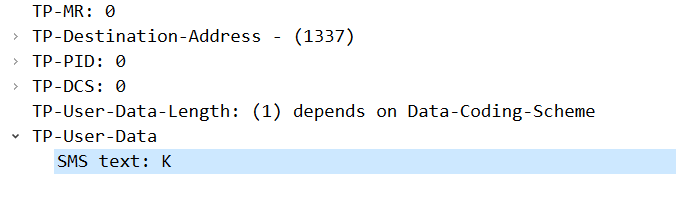
SMS PDU containing the message “K”

I’m using a common Qualcomm based smartphone, and here’s the numbers I’ve got from Wireshark when I send the message:

Transport Ethernet Header – 14 Bytes
Transport IP Header – 20 Bytes
Transport UDP Header – 8 Bytes
Transport GTP Header – 12 Bytes
User IP Header – 20 Bytes
IPsec ESP Header (For Um interface protection) – 22 Bytes
Encapsulated UDP Header – 8 Bytes
SIP Headers – 707 Bytes
SMS Header – 16 Bytes
SMS Message Body “K” – 1 Byte

Overall SIP, ESP, GTP and Transport PCAP for SIP MESSAGE

That seems pretty bad in terms of efficiency, but let’s look at how that actually works out:

This means our actual message body makes up just 1 byte of 828 bytes, or 0.12% of the size of the overall payload.

Even combined with the SMS header (which contains all the addressing information needed to route an SMS) it’s still just on 2% of the overall message.

So USSD efficiency isn’t great, but it’s not alone!

Charging problem on Fluke 990 CopperPro

I have a bit of a thing for Test Sets

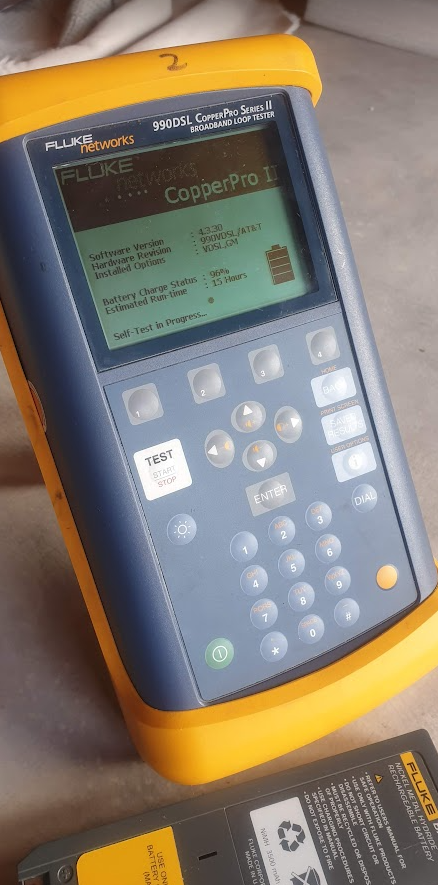
Arguably, the most capable (toolbox-carryable) test set out there is the Fluke 990 CopperPro, combined TDR, Butt Set, Toner, RFL, Noise meter, etc, etc, it’s a really cool gizmo (And probably worthy of a blog post in itself someday).

Alas mine had stopped taking much of a charge, you’d plug it into the charger, and after 20 minutes of use, it’d report low power and shut down.

Sitting on the charger the Fluke would show the red charging light for about 20 minutes, then the charging light would turn off.

If I unplugged and replugged the charger I’d get red charging light for another few minutes, then turn off again.

Naively, I ruled it to be an issue with the battery (Which is close to 10 years old), and ordered a new one.

But with the new battery in hand, the same issue.

Stupidly, it turns out I was using a 15v charger, technically the unit supports a 15v charger, but it seems after a period, the internal voltage regulator overheats and shuts off, meaning the battery never got a good charge.

Swapping it with a 12v charger and I’m charging without issues.

But not before I ended up ordering a new battery, so now with the new battery I’m getting 15 hours of runtime out of a charge, and still squeezing 7 out of 8 year old battery it originally came with.

Dumb mistake but hopefully an easy fix for anyone with the same issue.