
Monthly Archives: December 2021

Evolved Packet Core – Analysis Challenge

This post is one of a series of packet capture analysis challenges designed to test your ability to understand what is going on in a network from packet captures.
Download the Packet Capture and see how many of the questions you can answer from the attached packet capture.

The answers are at the bottom of this page, along with how we got to the answers.

This challenge focuses on the Evolved Packet Core, specifically the S1 and Diameter interfaces.

Why is the Subscriber failing to attach?

And what is the behavior we should be expecting to see?

What is the Cell ID of this eNodeB?

What is the Tracking Area?

That the subscriber is trying to attach in.

Does the device attaching to the network support VoLTE?

What type of IP is the subscriber requesting for this PDN session?

Is the device requesting an IPv4 address, IPv6 address or both?

What is the Diameter Application ID for S6a?

You should be able to ascertain this from information from the PCAP, without needing to refer to the standards.

What is the Crytpo RES returned by the HSS, and what is the RES returned by the SIM/UE?

Does this mean the subscriber was authenticated successfully?

Answers

Answer: Why is the Subscriber failing to attach?

The Diameter Update Location Request in frame 10 does not get answered by the HSS. After 5 seconds the MME gives up and rejects the connection.

Instead what should have happened is the HSS should have responded to the Update Location Request with an Update Location Answer, as we covered in the attach procedure.

Answer: What is the Cell ID of this eNodeB?

In Uplink messages from the eNodeB the EUTRAN-GCI field contains the Cell-ID of the eNodeB.
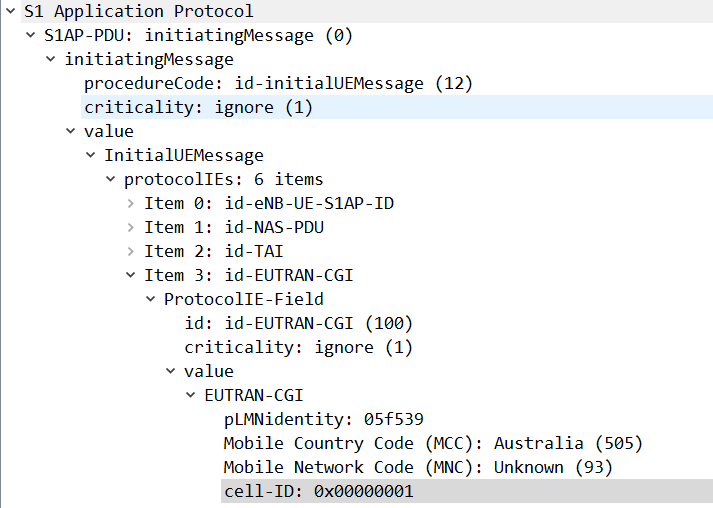
In this case the Cell-ID is 1.

Answer: What is the Tracking Area?

The tracking area is 123.
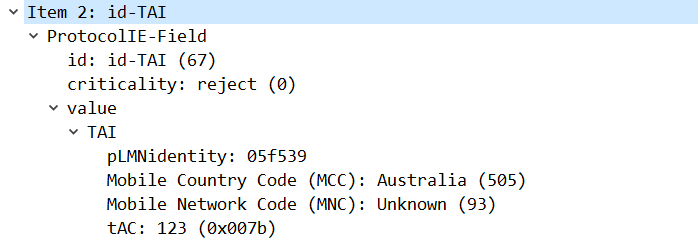
This information is available in the TAI field in the Uplink S1 messages.

Answer: Does the device attaching to the network support VoLTE?

No, the device does not support VoLTE.

There are a few ways we can get to this answer, and VoLTE support in the phone does not mean VoLTE will be enabled, but we can see the Voice Domain preference is set to CS Voice Only, meaning GSM/UMTS for voice calling.

This is common on cheaper handsets that do not support VoLTE.
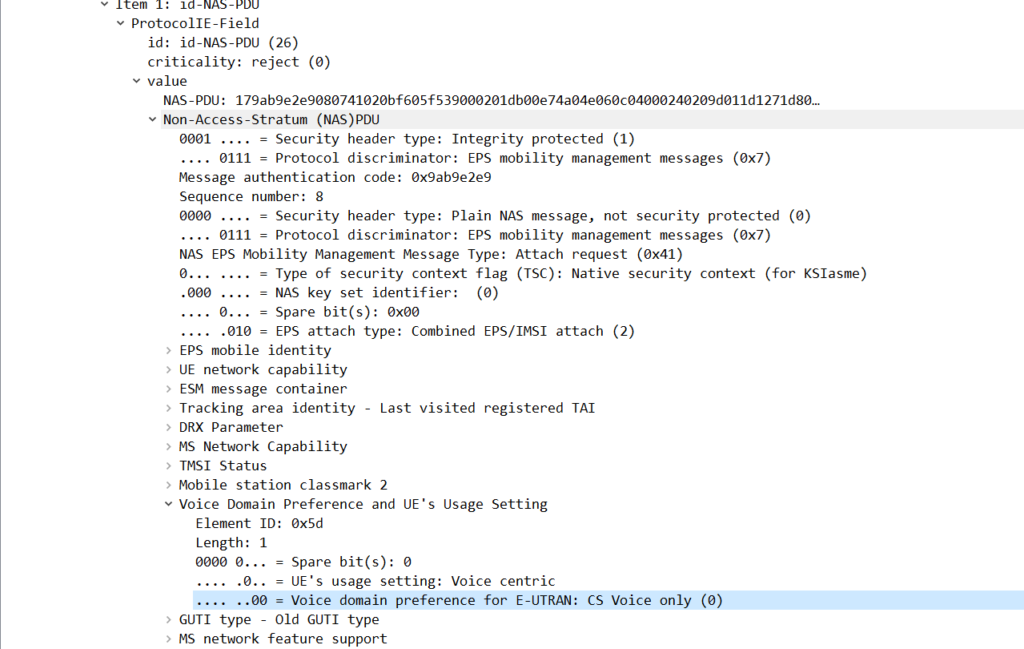
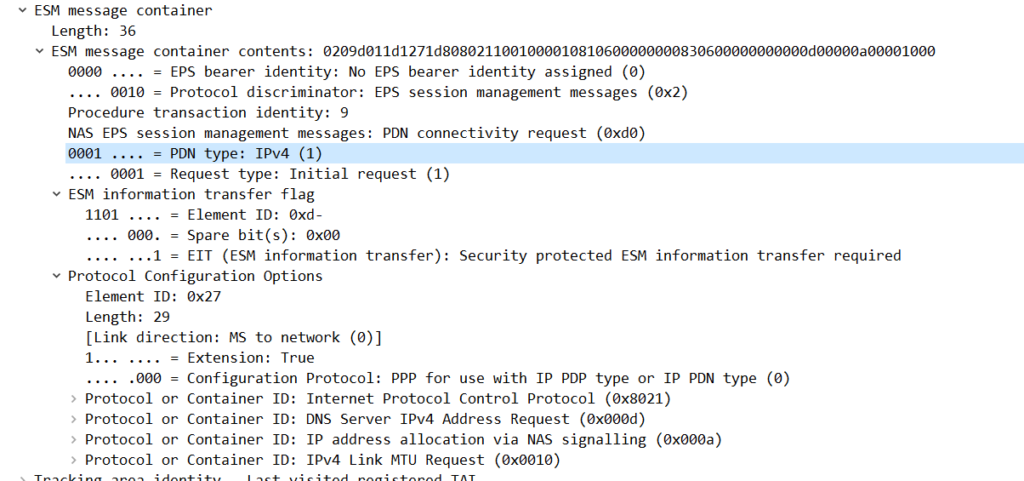
Answer: What type of IP is the subscriber requesting for this PDN session? (IPv4/IPv6/Both)?

The subscriber is requesting an IPv4 address only.

We can see this in the ESM Message Container for the PDN Connectivity Request, the PDN type is “IPv4”.
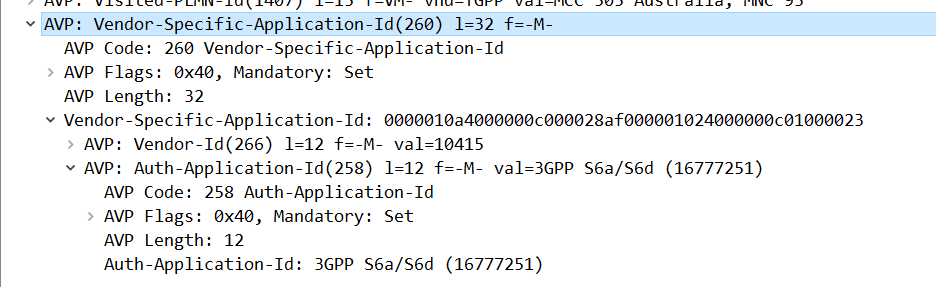
Answer: What is the Diameter Application ID for S6a?

Answer: 16777251

This is shown for the Vendor-Specific-Application-Id AVP on an S6a message.
Answer: What is the Crytpo RES returned by the HSS, and what is the RES returned by the SIM/UE?

The RES (Response) and X-RES (Expected Response) Both are “dba298fe58effb09“, they do match, which means this subscriber was authenticated successfully.
You can learn more about what these values do in this post.

The Surprisingly Complicated World of SMS: Apple iPhone MT SMS

In iOS 15, Apple added support for iPhones to support SMS over IMS networks – SMSoIP. Previously iPhone users have been relying on CSFB / SMSoNAS (Using the SGs interface) to send SMS on 4G networks.

Getting this working recently led me to some issues that took me longer than I’d like to admit to work out the root cause of…

I was finding that when sending a Mobile Termianted SMS to an iPhone as a SIP MESSAGE, the iPhone would send back the 200 OK to confirm delivery, but it never showed up on the screen to the user.

The GSM A-I/F headers in an SMS PDU are used primarily for indicating the sender of an SMS (Some carriers are configured to get this from the SIP From header, but the SMS PDU is most common).

The RP-Destination Address is used to indicate the destination for the SMS, and on all the models of handset I’ve been testing with, this is set to the MSISDN of the Subscriber.

But some devices are really finicky about it’s contents. Case in point, Apple iPhones.

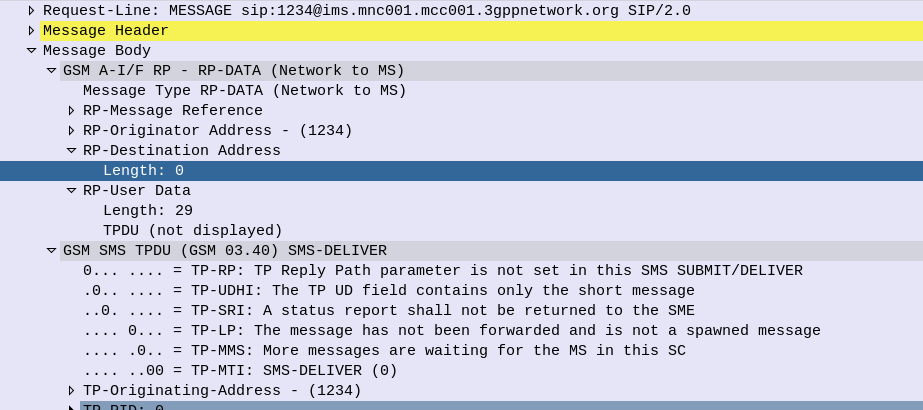
If you send a Mobile Terminated SMS to an iPhone, like the one below, the iPhone will accept and send back a 200 OK to this request.

The problem is it will never be displayed to the user… The message is marked as delivered, the phone has accepted it it just hasn’t shown it…

SMS reports as delivered by the iPhone (200 OK back) but never gets displayed to the user of the phone as the RP-Destination Address header is populated

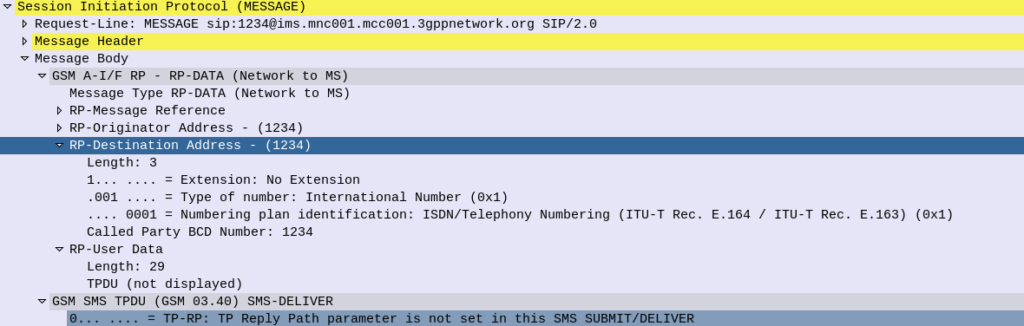
The fix is simple enough, if you set the RP-Destination Address header to 0, the message will be displayed to the user, but still took me a shamefully long time to work out the problem.

RP-Destination Address set to 0 sent to the iPhone, this time it’ll get displayed to the user.

Installing Yate from Source on Ubuntu 20.04

Here’s my build instructions for compiling and running Yate on Ubuntu 20.04 from source:

apt-get update
apt-get install wget make gcc autoconf subversion libsctp-dev libsctp1 g++ -y
cd /usr/src
svn checkout http://voip.null.ro/svn/yate/trunk yate
cd yate
vi /etc/modprobe.preload

Enable SCTP by adding “sctp” into the file and saving, then we can get on with compilation:

modprobe sctp
sysctl -p
./autogen.sh
./configure --enable-sctp=yes
make
make install-noapi
ldconfig
yate -V

And done, Yate installed with SCTP support, for all your SIGTRAN needs!

Soon we’ll be using this in our series investigating SS7 networks…

Kamailio Bytes – Working with Redis

I’ve become a big fan of Redis, and recently I had a need to integrate it into Kamailio.

There are two modules for integrating Kamailio and Redis, each have different functionalities:

  • db_redis is used when you want to use Redis in lieu of MySQL, PostGres, etc, as the database backend, this would be useful for services like usrloc. Not all queries / function calls are supported, but can be used as a drop-in replacement for a lot of modules that need database connectivity.
  • ndb_redis exposes Redis functions from the Kamailio config file, in a much more generic way. That’s what we’ll be looking at today.

The setup of the module is nice and simple, we load the module and then define the connection to the Redis server:

import "ndb_redis.so"
modparam("ndb_redis", "server", "name=MyRedisServer;addr=127.0.0.2;port=6379")

With the above we’ve created a connection to the Redis server at 127.0.0.2, and it’s called MyRedisServer.

You can define multiple connections to multiple Redis servers, just give each one a different name to reference.

Now if we want to write some data to Redis (SET) we can do it from within the dialplan with:

redis_cmd("MyRedisServer", "SET foo bar", "r");

We can then get this data back with:

#Get value of key "foo" from Redis
redis_cmd("MyRedisServer", "GET foo", "r");
#Set avp "foo_value" to output from Redis
$avp(foo_value) = $redis(r=>value);
#Print out value of avp "foo_value" to syslog
xlog("Value of foo is:  $avp(foo_value))

At the same time, we can view this data in Redis directly by running:

nick@oldfaithful:~$ redis-cli GET foo

Likewise we can set the value of keys and the keys themselves from AVPs from within Kamailio:

#Set the Redis Key to be the Received IP, with the value set to the value of the AVP "youravp"
redis_cmd("MyRedisServer", "SET $ct $avp(youravp)", "r");

All of the Redis functions are exposed through this mechanism, not just get and set, for example we can set the TTL so a record deletes after a set period of time:

#Set key with value of the received IP to expire after 120 seconds
redis_cmd("MyRedisServer", "EXPIRE $ct 120", "r");

I recently used Redis for a distributed flooding prevention mechanism, where the Subscriber’s received IP is used as the key in Redis and the value set to the number of failed auth attempts that subscriber has had, by using Redis we’re able to use the same mechanism across different platforms and easily administer it.